
Doctor of Dental Surgery (DDS)

Andrea is a Registered Dental Hygienist who has transitioned into a leadership role as Regional Manager, bringing together her clinical background with a strong focus on practice growth, team development, and patient experience.
How the iTero Scanner Is Improving Invisalign Treatment
If you've been researching Invisalign treatment , you've probably come across a lot of the same information repeated across different websites. But here's what most of those pages don't tell you: the difference between a smooth Invisalign experience and one full of delays, poor-fitting aligners, and unexpected refinements often comes down to what happens in the very first appointment — specifically, how accurately your teeth are scanned.
At North York Smile Centre, we use the iTero intraoral scanner as the foundation for every Invisalign case we take on. This article walks you through why that matters, what you can expect during an iTero scan, and how digital scanning is changing the way Canadians experience Invisalign treatment.
Key Takeaways
- The iTero scanner creates a precise 3D digital model of your teeth without traditional messy putty impressions.
- More accurate digital scans help Invisalign aligners fit better and reduce the risk of unexpected refinements during treatment.
- The scanning process is fast, comfortable, and usually completed within a few minutes during the consultation.
- The Invisalign Outcome Simulator allows patients to preview a projected version of their future smile before treatment begins.
- Digital scanning eliminates many of the distortion risks associated with traditional impressions and physical molds.
- Invisalign treatment success still depends heavily on patient consistency, including wearing aligners for approximately 20 to 22 hours per day.
- The iTero scanner helps dentists identify complex tooth movements and bite issues early in the treatment planning process.
Find our Dental Clinic Near You
What Is the iTero Scanner?
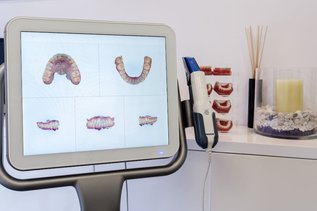
The iTero scanner is a handheld digital intraoral scanner used to create a precise, high-resolution 3D model of your teeth and bite. Instead of the old method — biting into trays filled with thick putty that sets around your teeth — a small scanning wand is moved gently around your mouth. As it moves, it captures thousands of images per second and assembles them into a complete digital model in real time, right there on the screen in front of you.
The iTero dental scanner is the same technology used by orthodontists and dentists across Canada and around the world. It integrates directly with the Invisalign treatment planning system, which means your scan moves seamlessly into the software used to design your custom aligners — no delays, no manual conversion, no risk of distortion in transit.
Why Scan Accuracy Matters More Than Most Patients Realize
Invisalign works by applying precise, controlled forces to specific teeth in a carefully calculated sequence. The system is designed around the exact position of every tooth in your mouth. If that starting data is even slightly off, those small errors compound over time — showing up as aligners that don't sit right, teeth that aren't tracking as planned, or refinements that add weeks or months to your treatment.
Traditional impressions introduced several points where accuracy could slip: the putty shifting as it set, distortion during removal, warping in transit, or inconsistencies when the mold was physically scanned by a technician. Any one of these could create problems that weren't obvious until well into treatment.
The iTero intraoral scanner removes those variables. The digital model is complete the moment the scan ends. There's no putty, no physical mold, and no shipping involved.
The practical result: aligners that fit better from the start, more predictable tooth movement throughout treatment, and fewer unplanned refinements along the way.
What Happens During an iTero Scan at North York Smile Centre
The scanning process is one of the fastest and most comfortable parts of any Invisalign consultation. Here's what to expect:
Before the scan: You're seated comfortably in the chair. No trays, no material, no preparation required.
During the scan: A small, lightweight wand is guided gently around your teeth. You'll be able to breathe normally throughout. Most patients are surprised by how quick and comfortable it is.
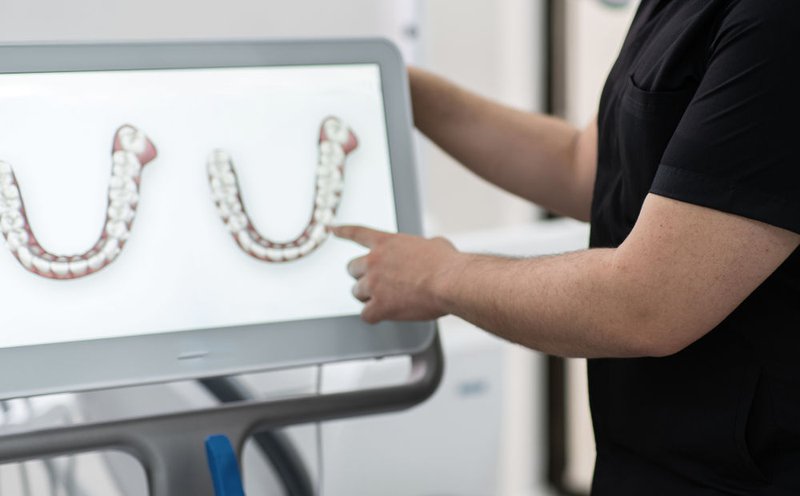
What you see: As the scan progresses, a live 3D model of your teeth appears on the screen in real time. You can watch your own teeth being mapped — most patients find this genuinely interesting.
Total time: A typical iTero scan is completed in a matter of minutes. The entire digital model is ready before you leave the appointment.
If a section needs more detail: Any area can be rescanned immediately, without restarting the whole process. This flexibility is one of the reasons the iTero scan produces consistently accurate results.
The Invisalign Outcome Simulator: See Your Results Before You Begin
One of the most valuable features that comes with the iTero scanner is the Invisalign Outcome Simulator. Using your digital scan as the foundation, this tool generates a projected visualization of how your smile is expected to look at the end of treatment.
This matters for a few reasons. First, it gives you clarity before committing to treatment — you're not agreeing to a process based on a verbal description alone. Second, it gives your dentist the ability to walk you through the planned movement step by step, answering questions before a single aligner has been made.
Important: The simulation is a projection based on your treatment plan, not a guarantee of exact results. Teeth respond differently for different patients, and real-world outcomes vary. But having a clear visual starting point makes the treatment feel less abstract and helps you stay motivated as you work through your aligner series.
iTero Scan vs. Traditional Impressions: A Direct Comparison
| Traditional Putty Impressions | iTero Digital Scan | |
|---|---|---|
| Comfort | Trays can cause gagging; material is messy | Comfortable; no trays or material required |
| Accuracy | Can vary — material, technician, and transit all introduce risk | Highly consistent; digital model complete at time of scan |
| Speed | Multiple steps; results not immediate | Completed in minutes; model ready same visit |
| Invisalign Integration | Requires physical scanning of the mold | Direct digital upload; no conversion needed |
| Risk of Distortion | Present at multiple stages | Significantly reduced |
| Rescan a Section | Requires full new impression | Instant; specific areas rescanned in seconds |
What Competitors Don't Tell You: Three Things That Actually Affect Your Invisalign Experience
Most articles about the iTero scanner and Invisalign focus on comfort and the simulation feature. Those things matter — but there are three areas that get less attention and have a bigger impact on your actual results.
1. How Your Scan Affects Mid-Treatment Refinements
Refinements are additional sets of aligners made during treatment to correct teeth that haven't moved exactly as planned. They're normal, and most Invisalign patients have at least some. But the number of refinements you need is influenced by the accuracy of your original scan.
A scan that captures precise data from the start gives the treatment planning software more accurate information to work with. This doesn't eliminate refinements entirely — nothing does — but it reduces the likelihood of unexpected ones caused by poor-fitting aligners rather than natural variation in tooth movement.
2. Your Role in How Well the Aligners Work
The iTero scan is only the starting point. Once your aligners are made, how you wear them determines how well your treatment progresses. Invisalign aligners need to be worn for approximately 20 to 22 hours per day to be effective. Removing them more frequently than that — especially for extended periods — can slow treatment and affect how well each aligner fits as you move through the series.
This is a point many articles gloss over. The technology works best when the patient is consistent. Your dentist at North York Smile Centre will walk you through what's realistic for your lifestyle and what to expect if your schedule makes consistent wear challenging.
3. Not All Cases Are the Same — And the Scanner Helps Identify Complexity Early
Some teeth movements are straightforward. Others — significant rotations, large gaps, bite correction — are more complex and may require additional tools like SmartForce attachments (small tooth-coloured shapes bonded to specific teeth to give aligners more precise control) or longer treatment timelines.
The iTero dental scanner gives your dentist a full, accurate picture of your bite and tooth positions at the planning stage. Complex cases can be identified early, timelines set more accurately, and expectations aligned before treatment begins — rather than mid-way through.
Who Is the iTero Invisalign Process Right For?
The iTero scan is used for every Invisalign assessment at North York Smile Centre, but Invisalign itself isn't the right choice for every case. The scanner helps identify this early.
Invisalign is typically a strong option for:
- Adults and teens with mild to moderate crowding, spacing, or bite issues
- Patients who value the ability to remove their aligners for eating and cleaning
- Anyone who has had difficulty with traditional impressions in the past
- Patients who want to see a projected outcome before committing to treatment
Cases that may require traditional braces or additional orthodontic consultation:
- Severe rotations or significant skeletal bite issues
- Cases requiring tooth extractions as part of the treatment plan
- Younger children whose teeth and jaw are still developing
Your North York Smile Centre dentist will review your iTero scan and be straightforward about which approach is most appropriate for your situation.
After the Scan: What Comes Next
Once your iTero scan is complete, here's how the process continues:
Treatment planning: Your scan is uploaded directly to the Invisalign system, where ClinCheck software maps out the precise movement of each tooth from your current position to the target position — step by step, aligner by aligner.
Review and approval: Your dentist reviews the digital plan and makes any adjustments before approving it for manufacture. You'll have the opportunity to view the simulation and ask questions.
Aligner fabrication: Your custom Invisalign aligners are manufactured and sent to the practice. Because they're built from your precise digital scan, they're designed to fit your teeth accurately from the first aligner.
Ongoing monitoring: Progress checks throughout treatment allow your dentist to confirm your teeth are moving as planned. If adjustments are needed, digital records make refinement planning faster and more targeted.
Retention: After your final aligner, you'll wear a retainer to hold your teeth in their new positions. Your dentist will recommend the right retainer type based on your case.
Book Your Invisalign Consultation at North York Smile Centre
The iTero scan is the first step in understanding whether Invisalign is right for you — and in making sure that, if it is, your treatment starts with the most accurate information possible.
If you're in the Vancouver area and considering Invisalign, book a consultation with North York Smile Centre. We'll complete your iTero intraoral scan, walk you through your outcome simulation, and give you an honest picture of what treatment would look like for your specific situation.
Book Your Consultation at North York Smile Centre
Frequently Asked Questions
Do you need an iTero scanner for Invisalign?
While some providers still use physical impressions that are then digitized, the iTero scanner is the preferred method and is used by North York Smile Centre for all Invisalign cases. It offers greater accuracy and a more comfortable experience than traditional impressions.
How long does an iTero scan take?
Most scans are completed within a few minutes. The complete 3D model is ready the same visit.
Is the iTero scan comfortable?
Yes. There are no trays and no impression material. The handheld wand moves gently around your teeth and most patients find it significantly more comfortable than traditional impressions.
Is the iTero scanner compatible with Invisalign?
Yes — the iTero scanner is made by Align Technology, the same company that makes Invisalign. The two systems are designed to work together, with scans uploading directly into the Invisalign treatment planning software.
What is the iTero Outcome Simulator?
It's a software tool that uses your digital scan to generate a projected visualization of how your smile may look after completing Invisalign treatment. It's a planning tool, not a guarantee of results.
How is an iTero scan used in Invisalign treatment?
The scan creates the digital model that serves as the foundation for your entire treatment plan. It's used to design your custom aligners, map tooth movement, and generate your outcome simulation.
Does using iTero improve Invisalign accuracy?
Yes. Because the scan captures precise digital data directly, it eliminates the distortion risks associated with physical impressions. More accurate starting data contributes to better-fitting aligners and more predictable tooth movement.
What is the 22-hour rule for Invisalign?
Invisalign aligners should be worn for approximately 20 to 22 hours per day to stay on track with your treatment plan. Removing them more frequently can slow progress and affect how each subsequent aligner fits.